No ads. Really.
No sponsored posts interrupting your neighborhood feed. The focus stays on what your neighbors have to say.
Neighbors helping neighbors. No ads. A feed you control.
Borrow a ladder. Find a lost pet. Get a local recommendation. The Loop keeps the useful neighborhood conversations—and lets you choose what you see and how you keep up.
Prefer an email list? Join on the web and choose email participation.
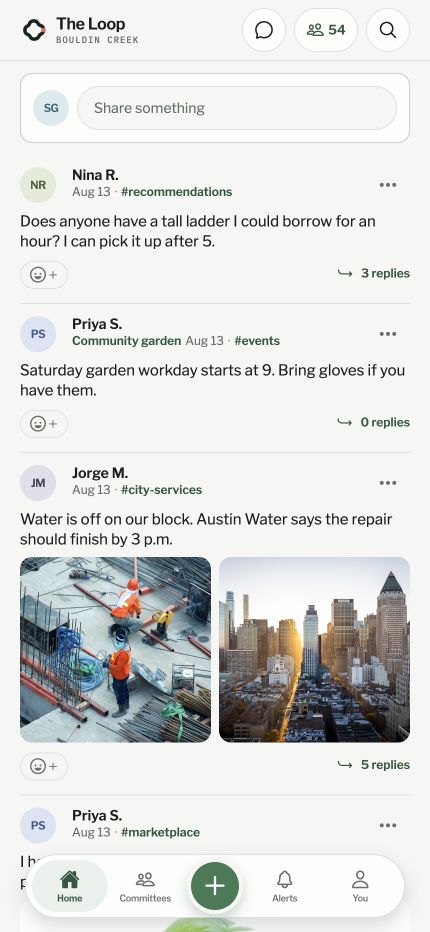
App screenshot with example conversations.
A neighborhood app should help you connect with the people nearby. Here’s what The Loop does differently.
No sponsored posts interrupting your neighborhood feed. The focus stays on what your neighbors have to say.
A chronological feed, with no engagement ranking deciding what rises to the top. Filters hide posts; they don’t reorder the rest.
Mute topics or people. Hide politics or threads flagged as contentious. Your choices change your own view.
Participate through email, the website, or the iPhone app. You don’t have to install another app to join your neighbors.
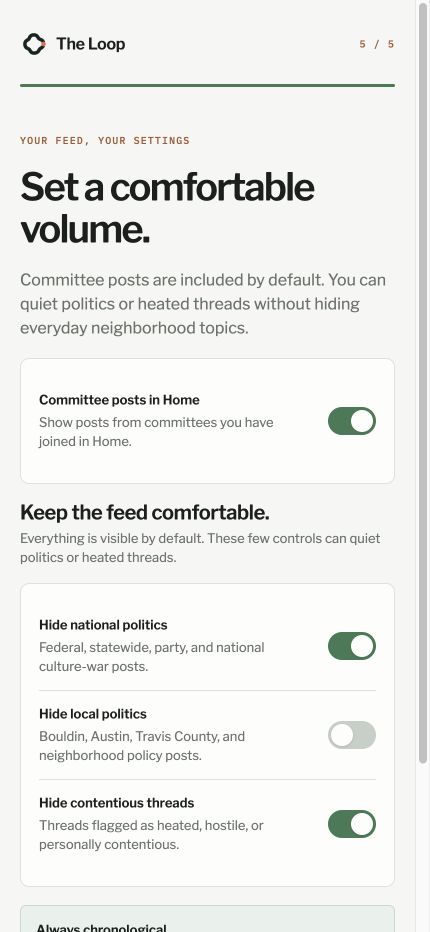
Want neighborhood recommendations without the political debate? That’s your call.
Choose the topics you want, quiet voices you’d rather not hear, and hide threads flagged as heated. These controls affect what you see, not what your neighbors are allowed to say.
Posts stay in time order. Your settings stay yours.
App screenshot: onboarding feed controls. You can adjust your preferences after joining.
The same community, with a choice of how to participate. Create your account, join Bouldin Creek, and choose what works for you.
Choose “Mostly through email” to receive neighborhood conversations in your inbox. Reply to a conversation email and your neighbors can see your reply in The Loop, too.
Pick every message, a daily summary, or a weekly summary. You can join from the website without installing the app.
Read the chronological feed, post and reply, browse topics, and connect with neighbors. Use the iPhone app or open the website on your phone or computer.
Your feed controls help you choose the kinds of posts you want to see.
In notification settings, choose email and iPhone push schedules: right away, daily, weekly, or never. Choose which activities can notify you. For push alerts, open the iPhone app and allow notifications on your device.
Join with Apple, Google, or email, then follow the steps to join the neighborhood. The Loop is for adults 18 and older. Already a member? Your existing account works on the app and the website.